Parts, service, and returns with a status partners can see.
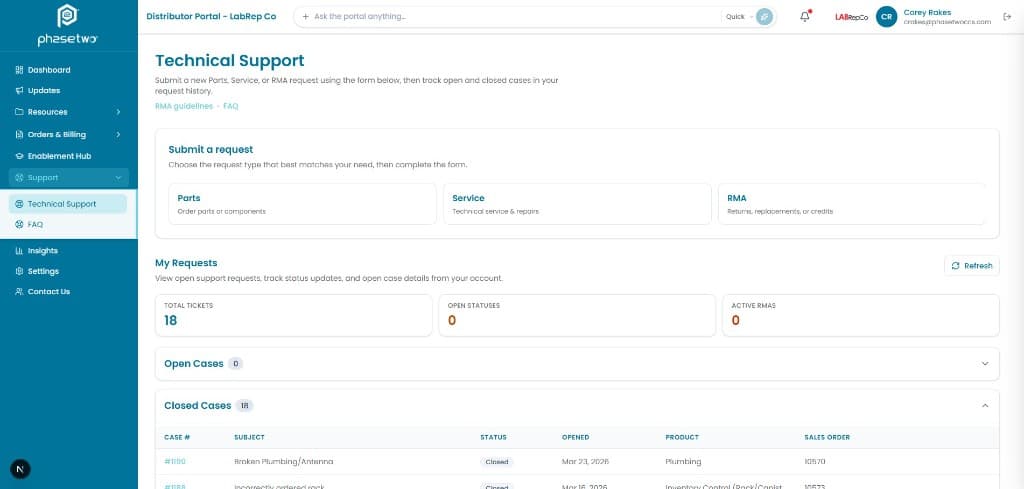
Distributors submit and track technical support and RMA requests in the portal instead of starting another email chain.
The cost of the status quo
A return that lives in a shared inbox has no status. The distributor calls. Your team hunts. The customer is already angry. Ticketing in the portal does not replace your service process. It gives the channel a window into it.
What partners get
- Submit Parts, Service, or RMA requests and track them without a phone tag loop.
- Open-request visibility on the dashboard so aging work is not invisible.
- FAQ alongside tickets so the first-line answers do not become tickets at all.
- Support overview for tenant admins: open volume, aging, and RMA-related requests.
Inside the portal
Who uses it
Distributor service
Opens and tracks RMAs in one place.
Your support desk
Receives structured requests instead of forwarded threads.
Tenant admin
Sees open work and aging across the partner base.
How it connects
Requests live in the portal with optional sync to your existing ticket or RMA process. Your service system stays the system of record for resolution.
Governance
Support is feature-gated. Admins see the overview; partners see their own requests.
Related capabilities
Orders, invoices & inventory
Account-specific order status, invoices, and authorized stock — from your ERP or analytics layer.
Read moreCoreTechnical Library
Manuals, regulatory files, FAQs, firmware, and change notices — in the field, not in someone’s inbox.
Read moreCoreThe Pulse
One authoritative channel: targeted announcements, monthly video, and an archive — not fourteen email threads.
Read more